
How Much Does AI Lip Sync Cost Per Video? 2026 Budget Math
AI lip sync can cost a few cents of allocated subscription value or several dollars of usage for one short video, but there is no universal per-video price. Duration, model, billing family and the number of accepted exports determine your actual cost. A ten-second clip is a useful comparison unit only after those conditions are fixed.
Checked: 2026-10-25. Dollar examples below are US-dollar calculations from official published rates, not invoices from new tests. Taxes, exchange rates, negotiated terms and account-specific offers are excluded. LipSyncX publishes this guide and offers related products; that commercial relationship is disclosed.
Compare the total cost per approved video: subscription allocation + generation usage + source production + review. A cheap render that must be repeated is not necessarily a cheap deliverable.
Why isn't there one AI lip sync price?
A photo-to-talking-video tool creates motion from a still image. An existing-video lip sync service changes a recorded performance to match a new audio track. A full dubbing workflow can add translation, voice synthesis, timing changes and subtitles.
These products may all appear in a search for “lip sync,” but the price buys different work. Before comparing, write down the deliverable: input type, final duration, number of languages, required resolution and whether you need a commercial clean export.
Then identify the unit on the invoice. Three common systems are a subscription with credits, a subscription plus metered usage, and a prepaid API balance. A minute allowance is another unit, usually with a rounding rule. None can be compared by treating every displayed credit as one video.
Our 2026 generator guide separates the workflows. Use the AI lip sync workspace when the task is matching permitted visual material to finished audio; finish the script and voice before paying to animate revisions.
The billing-model map
| Model | What you pay for | Useful cost equation | Main trap |
|---|---|---|---|
| Subscription credits | Access plus a recurring allowance | Credits used × allocated cost per usable credit | Unused credits raise effective cost |
| Subscription plus usage | Access fee and separately metered renders | Subscription share + frames or seconds × rate | Counting the usage rate as the whole invoice |
| Prepaid API | Funded balance and endpoint usage | Endpoint units × current API rate | Web-plan credits may not apply |
| Minute allowance | A duration pool | Rounded billable duration / usable allowance | Short clips can round upward |
| Self-hosted model | Hardware, operation and any licenses | GPU runtime + storage + engineering | “Free code” does not mean free commercial rights |
These equations are editorial budgeting methods. They are not promises about every provider's invoicing, refund or fractional-credit behavior. The final in-product quote is the right checkpoint for a job-specific debit.
What would ten seconds, one minute and five minutes cost?
Start with a simple existing-video usage example. Sync's model documentation lists lipsync-2 at $0.04–$0.05 per second and sync-3 at $0.107–$0.133 per second, expressed at 25 frames per second. These ranges vary by plan; they are not a guarantee that one account can choose either end.
| Output length | lipsync-2 usage at $0.05/sec | sync-3 usage at $0.133/sec |
|---|---|---|
| 10 seconds | $0.50 | $1.33 |
| 60 seconds | $3.00 | $7.98 |
| 300 seconds | $15.00 | $39.90 |
The table is arithmetic, not a measured invoice. It excludes subscription access, voice production and any separate dubbing charge. Sync's legacy billing guide explains frame-based lip sync billing and distinguishes it from credit-billed organizations. Frame rate matters: a per-second summary at 25 fps should not be silently extended to a different output frame rate.
A useful before-and-after budget is a five-minute source with only one minute needing a changed line or translation. If the supported workflow processes and bills only the required segment, your estimate should use that segment. If it regenerates the whole source, use the whole billable duration. Check the estimate endpoint or Studio quote rather than assuming an editor selection controls billing.
How do subscription credits become a per-video estimate?
HeyGen's current pricing page advertises Creator at $29 monthly with 600 credits. Dividing those numbers gives approximately $0.0483 of subscription allocation per included credit, but only if the entire allowance is usefully consumed. It is not a cash price at which a Creator user can necessarily buy an extra credit.
The HeyGen credit guide lists different model rates: Avatar III Photo Look uses 7 credits per minute, Avatar IV Photo Look 16 and Avatar V 48. Account and region can affect the displayed rate; the guide explicitly says the in-product generation quote governs the actual cost.
| Feature | Proportional 10-second estimate | Proportional 60-second estimate | Proportional 300-second estimate |
|---|---|---|---|
| Avatar III Photo Look | 1.17 credits | 7 credits | 35 credits |
| Avatar IV Photo Look | 2.67 credits | 16 credits | 80 credits |
| Avatar V Photo Look | 8 credits | 48 credits | 240 credits |
These are unrounded mathematical estimates. We have not verified the actual fractional debit for a ten-second job in a paid account. Do not round each cell yourself and label the result an observed charge.
For the Avatar IV example, 80 credits allocated at $29 / 600 is about $3.87 of plan value for five minutes. If that five-minute video is your only useful output of the month, however, the money you paid is still $29. Both statements can be true: one describes allocation, the other actual cash spent.
Why does Sync have two different price stories?
Some Sync organizations use the older subscription-plus-usage system. Others are enrolled in credit billing, with different plan names and included pools. A plan card for one family is not a quote for the other.
The current credit-billing documentation describes approximately 5 credits per second for lipsync-2 at 25 fps and states that top-up purchase prices vary by tier. Its usage credit valuation is not the same as the cash price paid for a top-up.
That creates three numbers to keep distinct: the credit debit for the job, the average cost of your included allowance, and the marginal price of additional credits. A spreadsheet that multiplies every debit by one cent can understate the cash required to replenish a balance.
For a new account, record the exact billing-family name before copying any public example. For a legacy account, review migration terms before switching. A larger-looking allowance can come with a different charging model or feature entitlement.
What is the D-ID rounding effect?
D-ID's Studio pricing FAQ says generated duration rounds up to the next 15-second interval. Therefore ten seconds consumes fifteen seconds of allowance, sixty consumes sixty, and five minutes consumes five minutes, assuming those exact final durations.
The short-clip difference is substantial: a ten-second output consumes 1.5 times its playback duration. A sixteen-second output consumes thirty seconds, or 1.875 times playback duration. Those multipliers are arithmetic consequences of the documented interval.
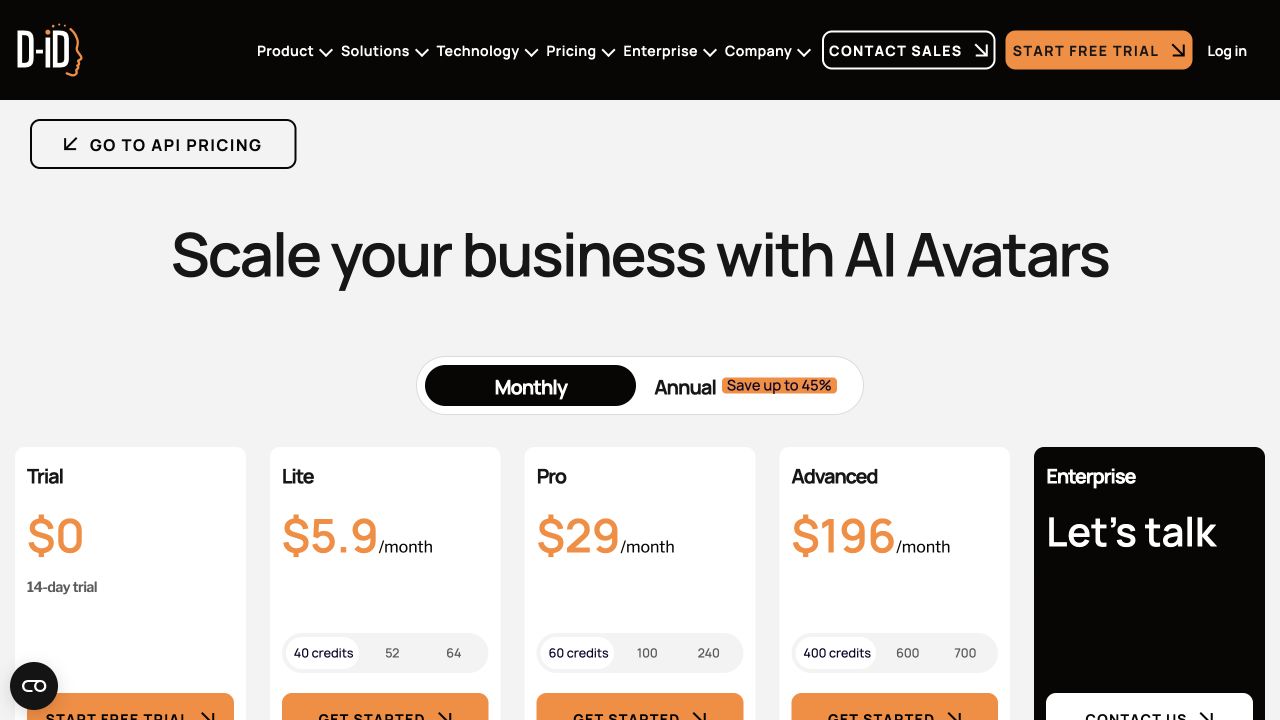
The live D-ID Studio cards were checked separately in a browser on 2026-10-25. The base credit selection shows the following; higher credit selections cost more, and API-specific plan cards are outside this table.
| D-ID Studio base option | Monthly billing | Regular monthly pool | Annual card, separate commitment |
|---|---|---|---|
| Lite | $5.90/month | 40 credits / 10 minutes | $4.70/month display; $56 billed annually |
| Pro | $29/month | 60 credits / 15 minutes | $16/month display; $191 billed annually |
| Advanced | $196/month | 400 credits / 100 minutes | $108/month display; $1,293 billed annually |
Official D-ID Studio pricing. Annual monthly displays are rounded by the provider; use the stated annual total rather than multiplying a rounded display by twelve. The page also advertises a first-month unlimited-video promotion with fair-use limits; the calculations below use regular pools and do not assume unlimited production.
Fully using the regular monthly allowance allocates about $0.59 per billable minute on Lite, $1.93 on Pro and $1.96 on Advanced. A ten-second clip rounds to fifteen billable seconds: approximately $0.15, $0.48 and $0.49 respectively. At sixty seconds the allocations are about $0.59, $1.93 and $1.96; at five minutes, $2.95, $9.67 and $9.80. These are plan-allocation calculations, not marginal purchases or observed debits.
The useful commercial comparison starts at the appropriately licensed tier. Lite's lower allocated rate is not a commercial-advertising offer; Pro's published commercial license changes the comparison. Check the current checkout, source permissions and exact product before buying.
This is also why cutting a long project into many tiny clips can change cost. Ten six-second outputs can consume more rounded allowance than one continuous sixty-second output. Whether that tradeoff is worthwhile depends on editability, retry scope and the provider's supported workflow.
How much should you budget for revisions?
Use explicit scenarios rather than inventing a vendor-wide failure percentage. Suppose your accepted deliverable is sixty seconds and each candidate generation costs $3 of metered usage. One candidate costs $3, two candidates cost $6 and three cost $9, before fixed fees and human review.
Those numbers do not claim that any tool needs three tries. They show how a revision decision affects the budget. Label your spreadsheet column “planned attempts” until you have your own project history.
Separate input revisions from model failures. A client changing the product name after approval is a new production decision; a visible artifact in the original specification is a different issue. Track both so future estimates reflect the right cause.
A simple approval gate saves money: lock the written script, approve the voice alone, approve one representative visual sample, then generate the remaining variations. If the voice pacing changes later, a previously approved lip sync may need rendering again.
What about failed jobs, refunds and late invoices?
Keep attempted renders separate from accepted videos in your worksheet. A failed submission, a provider-side failure and a completed but unusable output can have different billing treatment. This article does not assume that every failure is charged or that every unsatisfactory result is refunded.
Before a large batch, read the relevant refund and usage terms. Save the estimate and job status privately. If a debit looks wrong, compare the final output duration and selected features with the original quote before opening a support request.
For metered systems, the charge can arrive after the render rather than at submission. A low current credit balance is not necessarily a statement that all usage has been settled. Check pending invoices when closing the project or canceling access.
Report a batch's cost with a clear denominator: “total generation charges divided by accepted deliverables,” and specify whether subscription allocation and staff review are included. Keep the underlying attempt count so that the next estimate can improve without inventing a universal failure rate.
For example, a hypothetical $18 generation bill covering six accepted clips is $3 per accepted clip. If only three clips are approved, it becomes $6 per accepted clip even though the render-rate card did not change. Those numbers describe a budgeting scenario, not a measured vendor result.
The real commercial entry price can be higher
A low entry plan may retain a watermark or offer only personal use. That plan is an evaluation price, not necessarily the price of an advertisement you can deliver to a client.
D-ID's commercial-rights help page separates Trial, Lite and Build personal use from Pro, Advanced, Enterprise, Launch and Scale commercial use. Check the product family as well as the tier.
HeyGen's terms also distinguish free evaluation output from paid-plan output. Buying a paid tier still does not give you rights to someone else's photo, voice, music or endorsement.
Use the trial and watermark allowance comparison and commercial-use checklist before quoting a client. The cheapest acceptable plan is the one that satisfies the delivery requirement, not simply the cheapest visible number.
Build your own quote in six steps
- Specify the output. Record duration, language count, input type, model, aspect ratio and export resolution.
- Identify the billing family. Note web credits, API dollars, minute allowance or metered frames.
- Copy the current job estimate. Include rounding, minimum duration and any separate voice or translation charge.
- Allocate fixed fees honestly. Divide by the number of deliverables you expect to approve, not the theoretical maximum the plan can generate.
- Add revision scenarios. Show one, two and three attempts without presenting a guessed success rate as fact.
- Check delivery rights and expiration. Confirm commercial permission, watermark treatment and the deadline for using the allowance.
For one-off work, compare the result with no-subscription routes. For credit balances, read what expires and when. A smaller prepaid purchase can be cheaper than a discounted annual commitment you barely use.
FAQ
How much does AI lip sync cost per video?
There is no single rate. For a documented example, ten seconds of lipsync-2 usage at $0.05 per second is $0.50 before applicable access fees and other production work. Subscription-credit allocation can look lower, but unused allowance raises actual cost per approved video.
Are talking-photo and video-dubbing prices directly comparable?
Only after you match the task and included services. A portrait animation, a re-voiced interview and a translated training lesson can require different audio, motion and review work.
Is five minutes always five times the cost of one minute?
Not necessarily. It is true in a simple proportional usage example, but block rounding, minimums, frame rate, fixed fees and plan entitlements can change the relationship.
Are these actual billing tests?
No. The tables show source-based arithmetic. No new paid jobs or balance-debit screenshots were collected. Use the ten-second credit worksheet to compare your quote with your own ledger.
Budget the approved result
Open LipSyncX pricing, record the quote for your selected model and duration, and calculate the cost for the number of approved clips you need. Keep a copy of the current checkout and terms before purchasing.
Update record: 2026-10-25: recalculated examples using current official pages, separated Sync billing families and verified D-ID Studio price cards separately from incomplete text extraction. Prices and policies can change; the live account and checkout determine the offer.